


As cloud technologies evolve, businesses increasingly seek solutions that combine flexibility, security, and control. This is exactly where Virtual Private Cloud (VPC) comes in. At Delta.BG, we are expanding our cloud services portfolio with a new feature — VPC (Virtual Private Cloud).
In this article, you will learn what VPC is, how it works, and how you can use it to build a secure and efficient cloud infrastructure.
What is a Virtual Private Cloud (VPC)?
VPC (Virtual Private Cloud) is a secure and isolated virtual network within a public cloud. Within it, you can deploy servers, store data, host websites, and manage applications — similar to your own private infrastructure.
The difference is that instead of maintaining physical hardware, the entire infrastructure is hosted and managed by a provider like Delta.BG.
Within this private network, you deploy virtual machines and services that use private IP addresses and communicate internally without being directly accessible from the internet.
Delta Cloud VPC is a solution by Delta.BG that complements the Cloud VPS service, allowing our clients to create and manage secure, isolated virtual networks.
With Delta Cloud VPC you can:
- define your own IP range;
- align with on-premises networks;
- manage network access;
- deploy virtual machines and services, and manage the connections between them.
What Are the Benefits of Delta Cloud VPC?
Using VPC provides a number of key advantages for building a secure cloud infrastructure:
Enhanced Security and Isolation
Your resources are isolated from other clients in the cloud environment. By configuring firewall rules, security groups, and access control within the network, you can restrict communication to authorized sources only and reduce the risk of unauthorized access and external threats.
Full Network Control
You have complete control over the network configuration — including IP address ranges, subnets, routing rules, and resource access.
Flexibility and Scalability
Easily add new resources as your project requires. This scalability is especially useful for organizations with variable or unpredictable workloads. By using VPC, users can control the size of their virtual network and avoid underutilizing resources during quieter periods or overloading their infrastructure during peak times.
Private IP Addresses and Segmentation
Ability to separate infrastructure by role and environment.
Suitable for Both Test and Production Environments
Ideal for staging, development, and live systems.
Who is Delta Cloud VPC For?
VPC is an excellent solution for:
- Businesses working with sensitive data
- SaaS and web applications
- Developers building test/dev environments
- Companies with complex infrastructure
- Organizations that require a high level of security
Delta Cloud VPC is suitable for all cases where private cloud networks without direct internet access are needed.
How to Create a Delta Cloud VPC at Delta.BG:
To create a private network, you need an active Cloud VPS or Windows VPS at Delta.BG. Once you have virtual machines in our infrastructure, log in to your account in our client area. Then go to the "Services" menu, select the specific virtual machine for which you want to build a private network.
Creating a Network
- Navigate to the section
Go to the "Network Configuration" tab on the service page.
- Open the network creation window
In the "Available Networks from Project" section, click the "+ New Network" button to open a dialog for creating a new network.
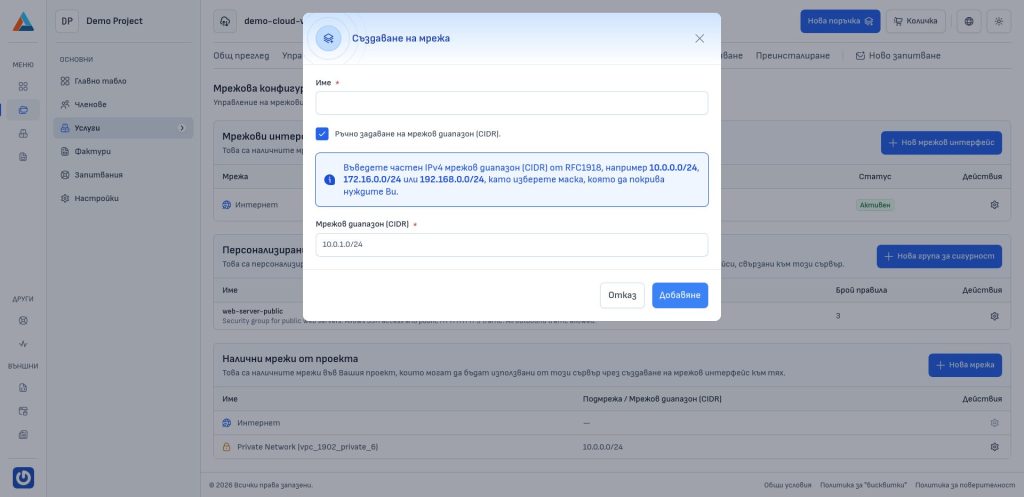
- Enter the details
- Name
Enter a name for the network for easy identification.
- Manually specify network range (CIDR)
Check this option if you want to define the network address range yourself. Enter a valid IPv4 network range (CIDR) from RFC1918, for example 10.0.0.0/24, 172.16.0.0/16, or 192.168.0.0/16, where the subnet mask can cover a different number of addresses.
If you do not check this option, the system will automatically assign a network range.
- Network range (CIDR)
Enter your preferred network range if you chose manual specification.
- Confirm
Click the "Add" button to create the network.
Deleting a Network
- Navigate to the section
Go to the "Network Configuration" tab on the service page.
- Select the network to delete
In the "Available Networks from Project" section, find the network you want to delete and click the delete button in the "Actions" column to open a confirmation dialog.
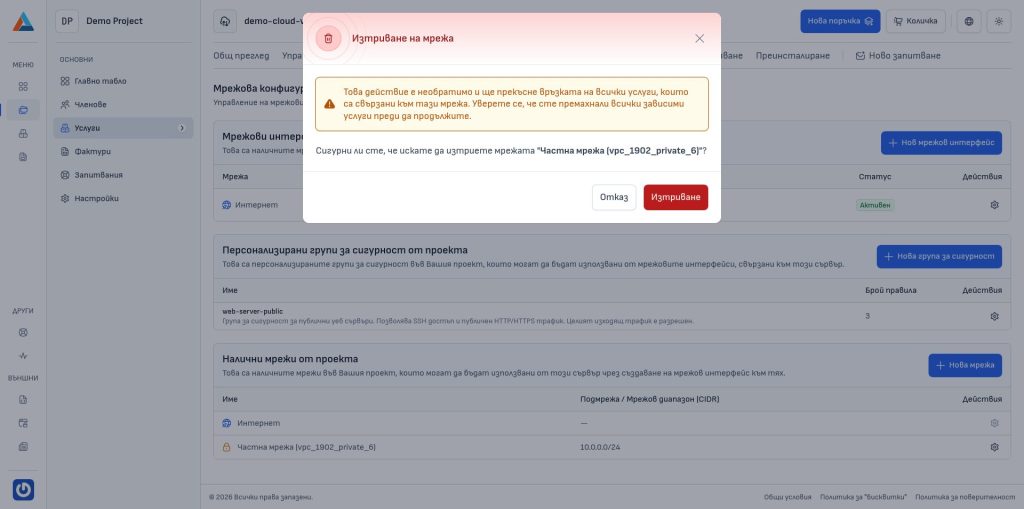
- Confirm
Click the "Delete" button to confirm the action.
Creating Network Interfaces
Network interfaces are virtual network adapters connected to your server. Each one is associated with a specific network and receives an IP address from its range. A security group can be applied to each interface to control inbound and outbound traffic.
- Navigate to the section
Go to "Network Configuration" on the service page.
- Open the creation dialog
In the "Network Interfaces" section, click the "+ New Network Interface" button to open a dialog.
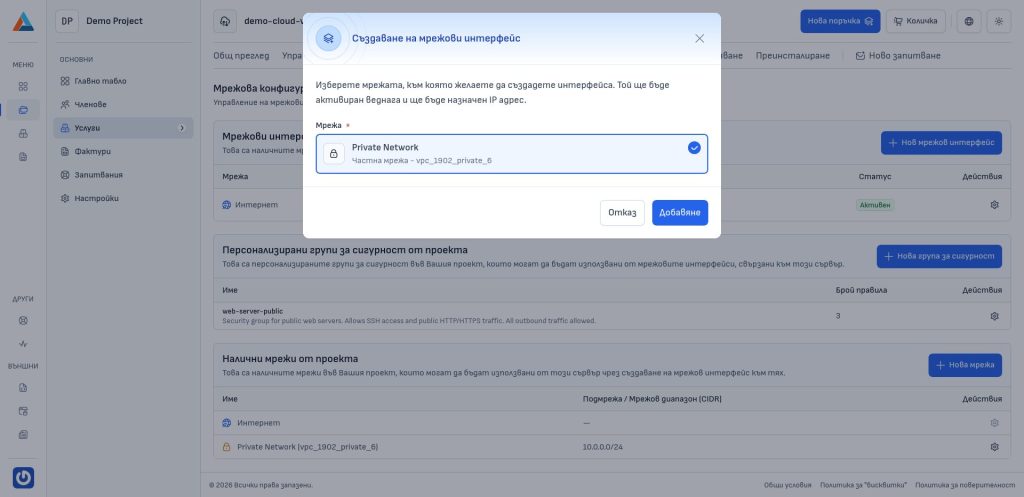
- Select the network
Choose the network you want to connect the new interface to. The list includes all available networks from your project.
- Confirm
Click the "Add" button to create the network interface.
Deleting a Network Interface
- Navigate to the section
Navigate to the "Network Configuration" tab on the service page.
- Select the interface to delete
In the "Network Interfaces" section, click the delete button in the "Actions" column of the interface you want to remove to open a confirmation dialog.
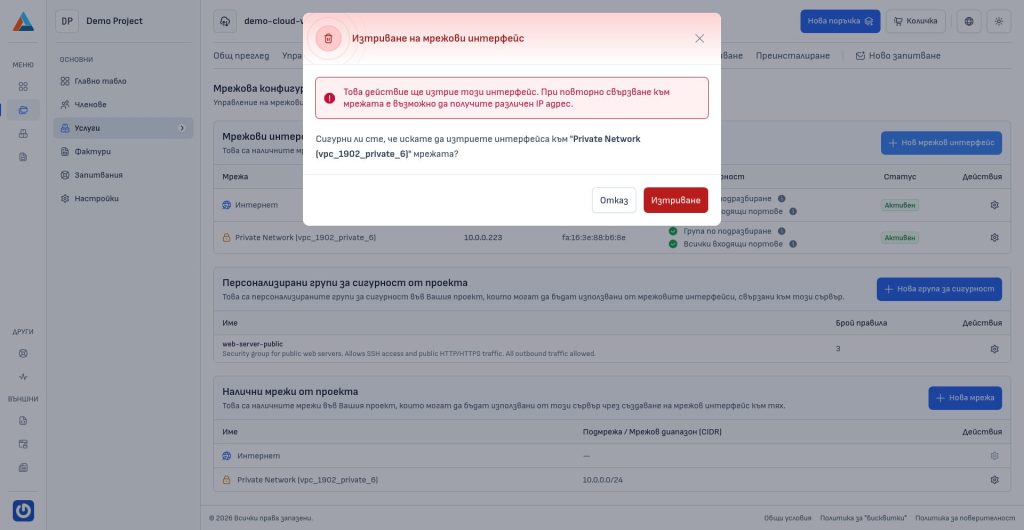
- Confirm
- Click the "Delete" button to confirm the action.
Conclusion
Virtual Private Cloud (VPC) is a solution for any business seeking greater security, control, and flexibility in their cloud infrastructure.
With Delta Cloud VPC, you can easily build your own isolated network and manage your resources efficiently.
Explore our VPC service and take the next step toward a more secure cloud.

